Talk to a specialist
Behind every application, an account

Credential records associated with your domains.

Identity · Remote access · Cloud · Development

Your team knows these applications. Credential thieves do too.

From VPN access to code repositories, your business relies on digital identities. When one is stolen, the risk can reach your organization. Investigate exposure records linked to your domains with Argus.

  • Okta
  • Citrix
  • Auth0
  • GitHub
  • GitLab
  • Cloudflare
  • Google Cloud
  • VPN

Examples of applications used in corporate environments.

The path of a stolen credential

The theft happens quietly. See what it leaves exposed.

An infostealer captures data from a device. Stolen credentials can circulate through cybercrime channels and put corporate access at risk. Argus links exposure records to your domains to support your investigation.

From an infected device to your team’s response

It starts on a device

Threat actorDistributes infostealers
Employees
External users

An infostealer steals credentials from devices used by employees or users of your services.

The data starts circulating

Forums
Markets
Credentials in the wrong hands
Stolen credentials
Corporate access

Stolen credentials circulate through illicit channels. Intelligence sources collect records of this exposure.

Argus connects the records

ArgusContext to investigate

Find records linked to your domains and examine the available information about exposed accounts.

Your team decides how to act

Your organization
Investigate accounts
Assess the risk
Decide the response

With evidence in hand, assess affected accounts and direct protective measures.

Illustrative flow. Argus supports the investigation; your team carries out the response.

How exposure reaches Argus.

Stolen credentials can circulate through forums, illicit markets, and other cybercrime channels, including the dark web. Specialized intelligence sources gather records from this ecosystem.

Argus correlates credential intelligence with external exposure and malicious infrastructure data. Records are linked to your scope and presented with their source, context and coverage so your team can move from discovery to investigation.

Inside the platform

Exposure is where the investigation begins.

Connect identities, assets and threats to the work that needs to be done. From the first signal to case review, give your team the evidence and context to decide.

Screenshots of the current Argus interface, shown in Portuguese with fictional demonstration data.

Exposed identities

A leaked password does not tell the whole story.

Does the account belong to an employee, a customer or a supplier? Which devices and applications are involved? Start with the domain overview and follow the evidence.

  • Domains and subdomainsTrack monitored scope, discoveries and the consolidated risk of each root domain.

  • People and critical accountsMonitor identities and VIPs. Distinguish employee, customer and third-party access.

  • A prioritized queueP1 to P4 levels combine severity, recency, exposure, credential weakness and VIP criticality to guide triage.

Recognize the access that matters to your business — and see where to start.
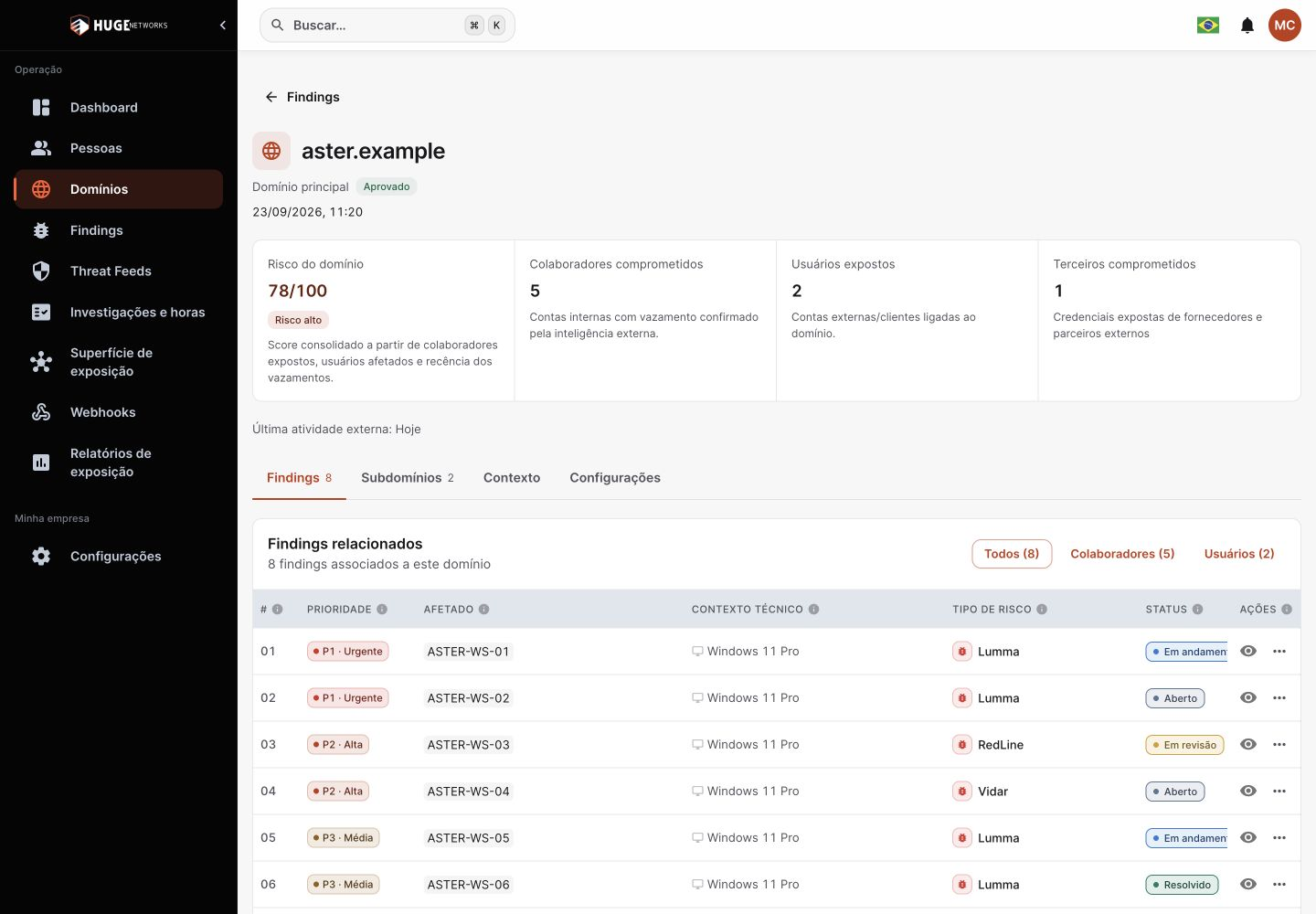
Argus interface showing domain risk, affected employees, customers and third parties, and a findings queue.

Domain view: from overall exposure to the devices involved.

View full screen
Investigation

Know which access was exposed. And where it came from.

Open a finding and reconstruct the compromise context without switching between disconnected records.

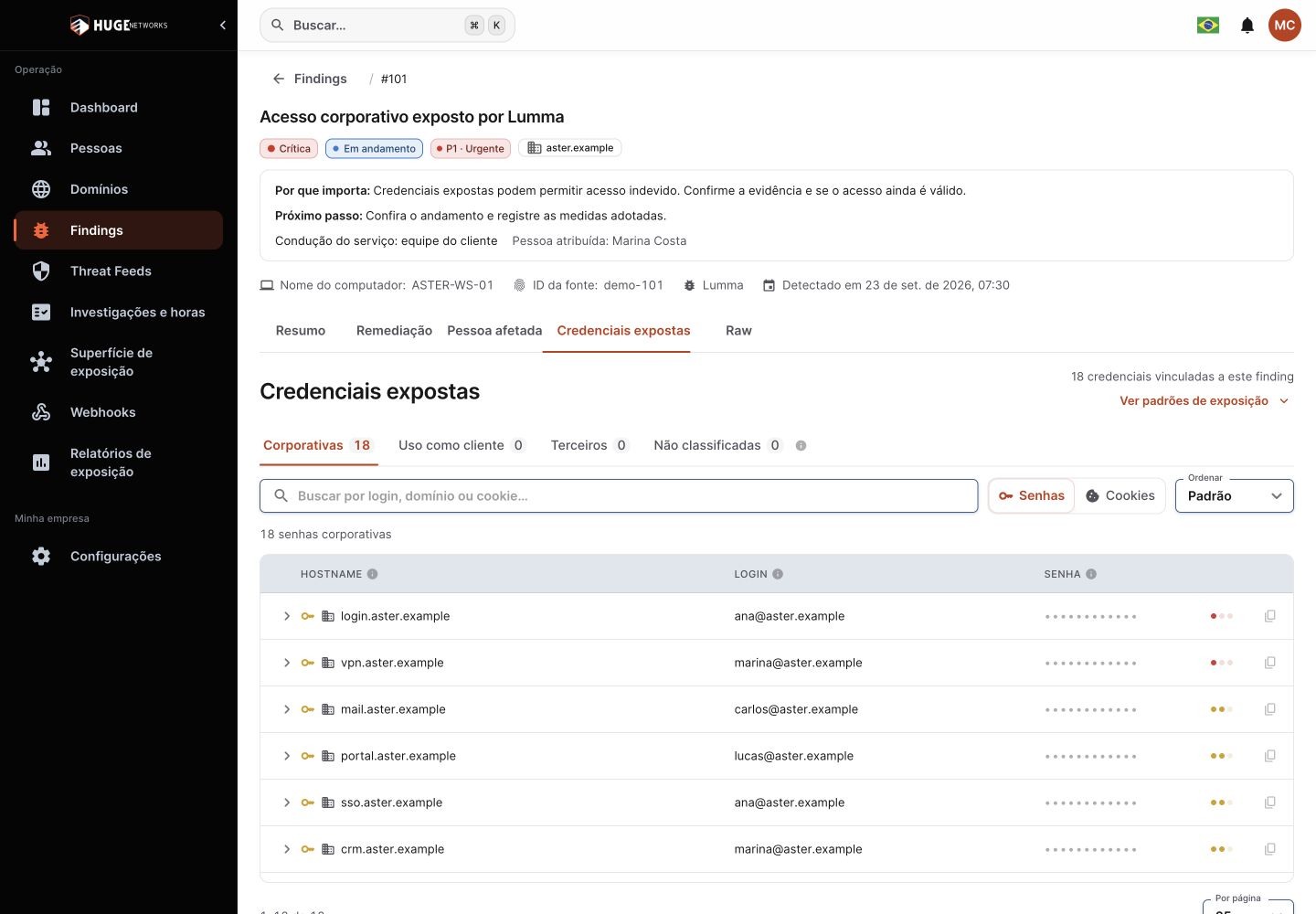
  • Credentials and sessionsLocate applications, logins, passwords and cookies in available records. Separate corporate access from customer and third-party usage.

  • The device behind the accountExamine the operating system, IP, malware, antivirus, software and available host artifacts.

  • Evidence you can verifyReview the source, dates and technical details available within your scope. Revealing sensitive data requires permission and is audited.

Actual Argus investigation interface showing corporate credentials, applications, logins and protected passwords.

Application, identity and usage context in the same investigation.

View full screen

External exposure

What is missing from your inventory may still open a door.

Extend your investigation to internet-facing assets and signs of brand abuse.

  • Discovery with validationReview new hosts and subdomains before adding them to monitoring. Examine asset observations and changes.

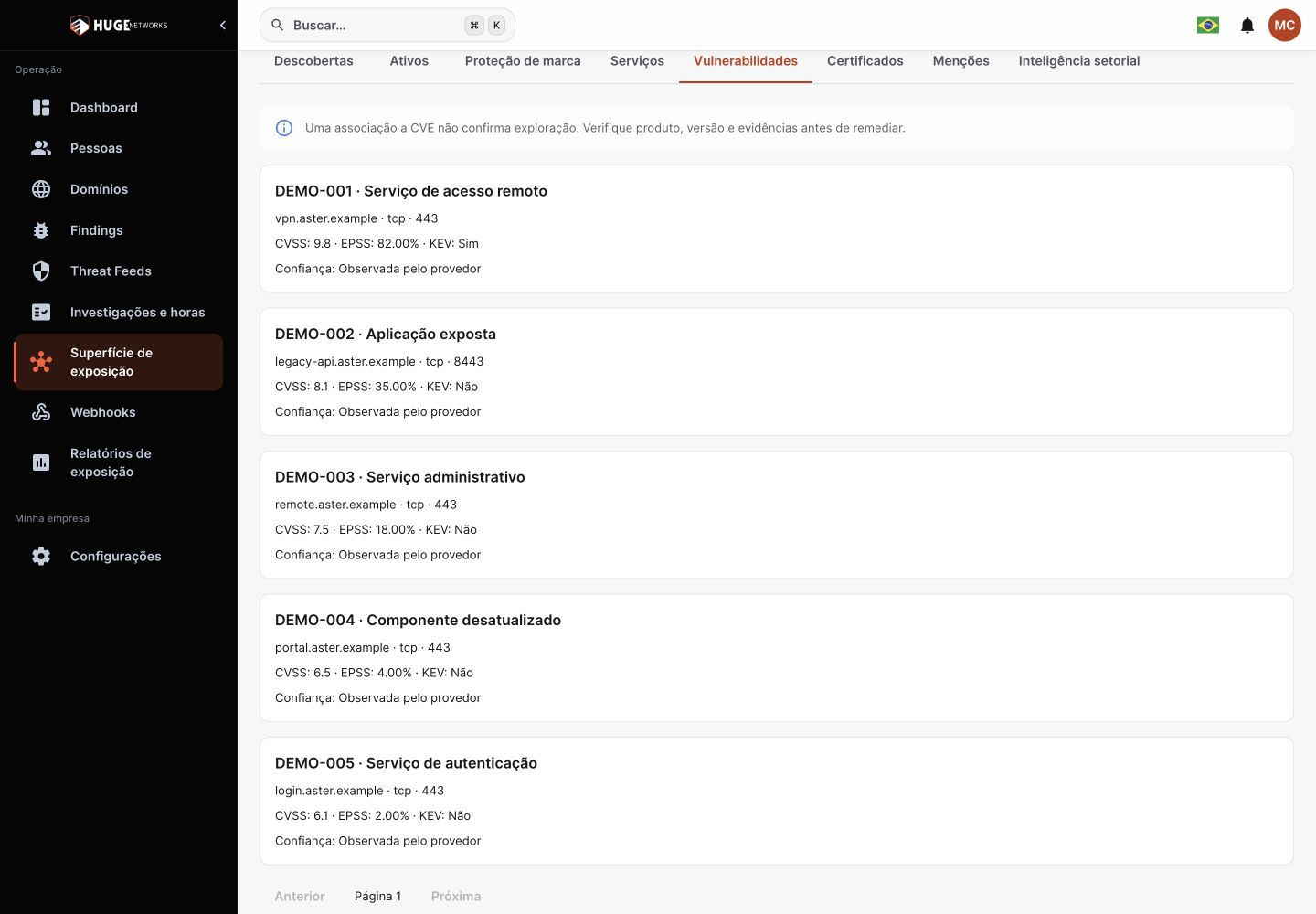
  • Technical exposure in contextConnect services, ports, certificates and vulnerabilities. Use CVE, CVSS, EPSS and KEV data when available.

  • Brand, mentions and evidenceInvestigate suspicious domains, dark web mentions and sector intelligence. Record web evidence and turn relevant signals into findings.

Argus interface showing vulnerabilities, affected services and CVSS, EPSS and KEV indicators in a fictional scenario.

Vulnerabilities and service context to prioritize validation and response.

View full screen

Threat Feeds

A global threat. A local question: does it touch your environment?

Correlate malicious infrastructure with monitored domains. “My exposure” helps distinguish general intelligence from signals related to your organization.

Command and control

Examine C2 hosts, malware families, IP addresses, ports and observation history.

Phishing as a service

Track PhaaS infrastructure and investigate by country, ASN, family and recency.

ClickFix

Investigate pages with fake verification challenges and signs of clipboard manipulation.

Export hosts and IPs from C2 and PhaaS feeds to support your rules and blocklists.

Cases and response

The alert has context. The case needs an owner.

Group discoveries into an investigation. Manage owners, next steps and review through the playbooks linked to findings.

  • One case, multiple pieces of evidenceGroup related findings and follow the treatment, owner and next action for each risk.

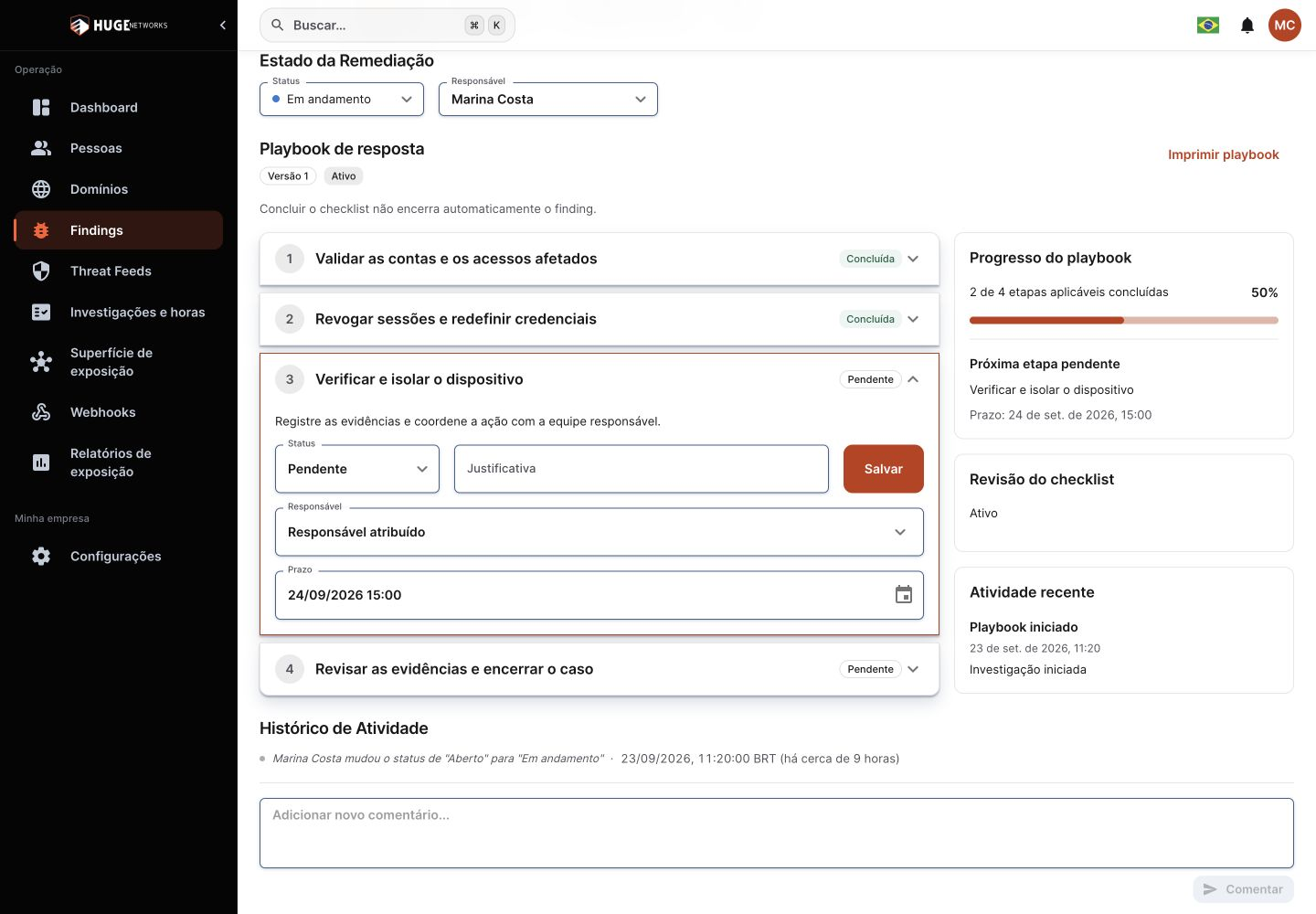
  • Playbooks that guide the workFollow steps with instructions, deadlines, owners and rationale. Track progress and submit the response for review.

  • Continuity across teamsPreserve comments and history. Record and review work hours when the operational workflow requires them.

Argus interface showing a response playbook, steps, progress and the next action.

A response workflow linked to incident evidence.

View full screen

Delivery and governance

Intelligence that reaches the people who need to act.

Bring evidence to operations, progress to management and events to the systems your team already uses.

Reports that document progress

Generate period snapshots with methodology, coverage and data limitations. Share PDF reports and exports for analysis.

Alerts and webhooks

Receive notifications and send events filtered by domain, priority and type. Track webhook deliveries and retries.

Controlled access

Define permissions and team scopes. Control sensitive information visibility and consult audit records.

Contracted scope, monitoring coverage and permissions determine available capabilities and data.

From discovery to containment

Scope the case. Stop unauthorized access.

An exposed credential is a signal to investigate. The next step is to understand which accounts and systems may be involved and coordinate a response with the people managing that access.

  1. Investigation with Argus

    Identify affected accounts

    Examine records linked to the domain, distinguish employees from customers, and identify the accounts that need to be checked.

  2. Identity and security teams

    Contain at-risk access

    Based on your assessment, reset passwords, revoke sessions, and restrict access in affected systems. If you suspect an infection, investigate the device.

  3. Incident response team

    Verify containment

    Validate the measures taken, record case evidence and submit the playbook for review. Preserve the history to track completed work and issues that still need attention.

Argus provides intelligence to scope exposure. Account blocking, session revocation, and device isolation are carried out by your team in its security and identity tools.

Questions about Argus

What does Argus identify?

Argus connects identity monitoring, credential investigation, external exposure and Threat Feeds. The platform organizes findings, cases, playbooks, reports and integrations to support response. Available capabilities depend on contracted scope, enabled sources and permissions.

Can I investigate employee and customer accounts?

Yes. You can analyze corporate credentials and customer access to your organization’s services, depending on the available records. This distinction helps focus the investigation and involve the right teams.

Does Argus block accounts or reset passwords?

Account blocking, password resets and device isolation take place in your organization’s security and identity tools. Argus gathers the evidence and organizes cases and playbooks to coordinate and document this work.

How do I request a demo and purchase Argus?

Argus is commercially available. Contact Huge Networks to request a demo, explore its capabilities, and discuss the right scope for your organization.

Technical content

Resources for further reading

An editorial selection of guides and analyses related to this solution.

ArgusGuided demo

From exposure to the next decision.

See how Argus connects exposed credentials, your external attack surface and investigation to guide your team’s response.

What we’ll explore

  • Understand each exposed account

    Connect credentials, identities and domains to investigate risk with context.

  • Find what needs attention

    Correlate credential exposure with assets and services on your external attack surface.

  • Move from investigation to response

    Gather evidence into cases, assign owners and track next steps.

A conversation about your operation.

Explore the use cases and scope that make sense for your team.

Request your demo

Explore Argus in a presentation with our team.

All fields are required.

About you
Your company

By submitting, you agree to our Privacy Policy.

What happens next?

Our team will contact you to understand your goals and arrange the demo.